Cellular tools
Cellular tools has a reference of LTE and 5G NR bands and a set of calculators for decoding cell identifiers. Open it from More > Tools > Cellular tools. A toggle at the top switches between the two panes, Bands and Calculators. Bands is the default.
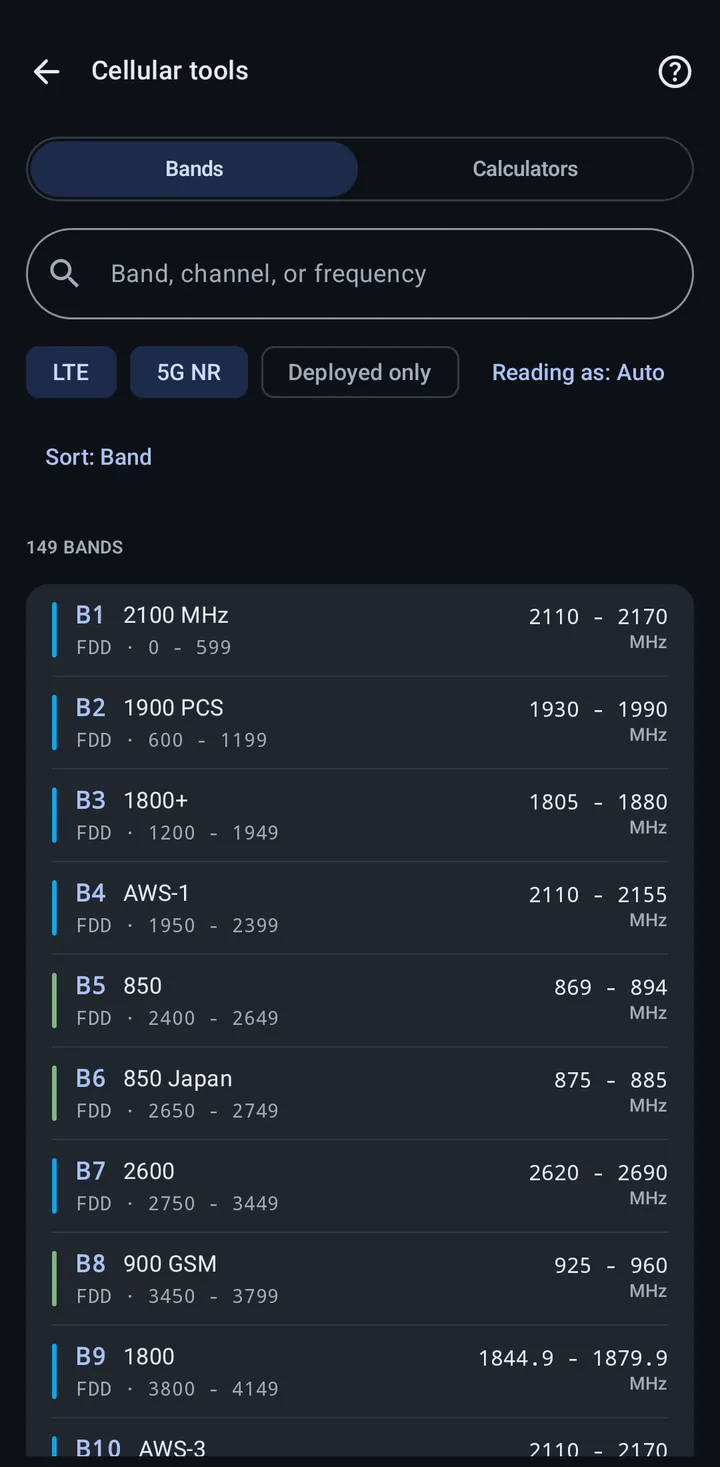
The list shows every band with its name, duplex mode, channel numbers, and downlink frequency range. Tap a band for its details: the downlink and uplink ranges, total width, duplex spacing, channel numbers, channel bandwidths, and, for 5G NR, subcarrier spacing, as far as the reference has them.
- Search (Band, channel, or frequency): type a band name or number, a channel number, or a frequency. A number can mean several things, so the results are grouped by how it was read, such as Band number, As LTE EARFCN, As 5G NARFCN, and At this frequency.
- LTE and 5G NR: show LTE bands, NR bands, or both (the default).
- Deployed only: hide the bands marked Reference only. Those are listed for reference but never used to label a live cell, because letting them match would make a widely deployed band impossible to identify.
- Reading as: leave it on Auto to see every way a number can be read, or pin it to Band number, EARFCN, NARFCN, or Frequency when you are doing the same kind of lookup over and over.
- Sort: by Band, Frequency, or Widest channel.
The LTE, 5G NR, and Deployed only chips narrow the list. A search always looks through every band.
NR band ranges overlap, so a channel number alone cannot always identify one band. Where it cannot, every candidate is listed. Your phone reports the band directly when it can. The help button in the top bar explains this.
The same band details open when you tap the Band value on the Cellular view.
Calculators
Section titled “Calculators”Pick the network type at the top of the pane, UMTS, LTE (the default), or NR, to see its calculators. Results update as you type, and a value out of range shows what range is allowed.
- UMTS Cell ID to RNC ID and short Cell ID: splits a 28-bit UMTS Cell ID into the RNC ID and the Short Cell ID.
- Cell ID to eNB ID and sector ID: splits a 28-bit LTE Cell ID into the eNB ID (the first 20 bits) and the Sector ID (the last 8 bits).
- PCI to PSS and SSS: splits a Physical Cell ID (0 to 503) into its primary and secondary synchronization sequences.
- Channel to band: finds the band and frequency for an EARFCN. Browse all bands opens the Bands pane with that channel searched.
- NCI to gNB ID and sector ID: splits a 36-bit NR Cell Identity into the gNB ID and the sector ID. Choose the gNB ID length first, from 22 to 32 bits (24 bits is preselected); the sector ID gets the rest of the 36 bits. The length is set by each network, so check what your operator uses.
- Channel to band: finds the band and frequency for an NARFCN. Because NR band ranges overlap, more than one band can match. Browse all bands opens the Bands pane with that channel searched.
Related
Section titled “Related”- Cellular networks: the Cellular view and its fields
- Cellular terminology: what each identifier means
- PLMN lookup: look up operators by MCC-MNC