gRPC streaming
The gRPC stream destination sends survey records live to a gRPC server you run, as binary Protocol Buffers messages. It suits a custom server that already uses Protocol Buffers; for most other setups, MQTT is simpler.
The gRPC stream page
Section titled “The gRPC stream page”Tap the gRPC stream row on the Survey tab, or go to More > gRPC stream.
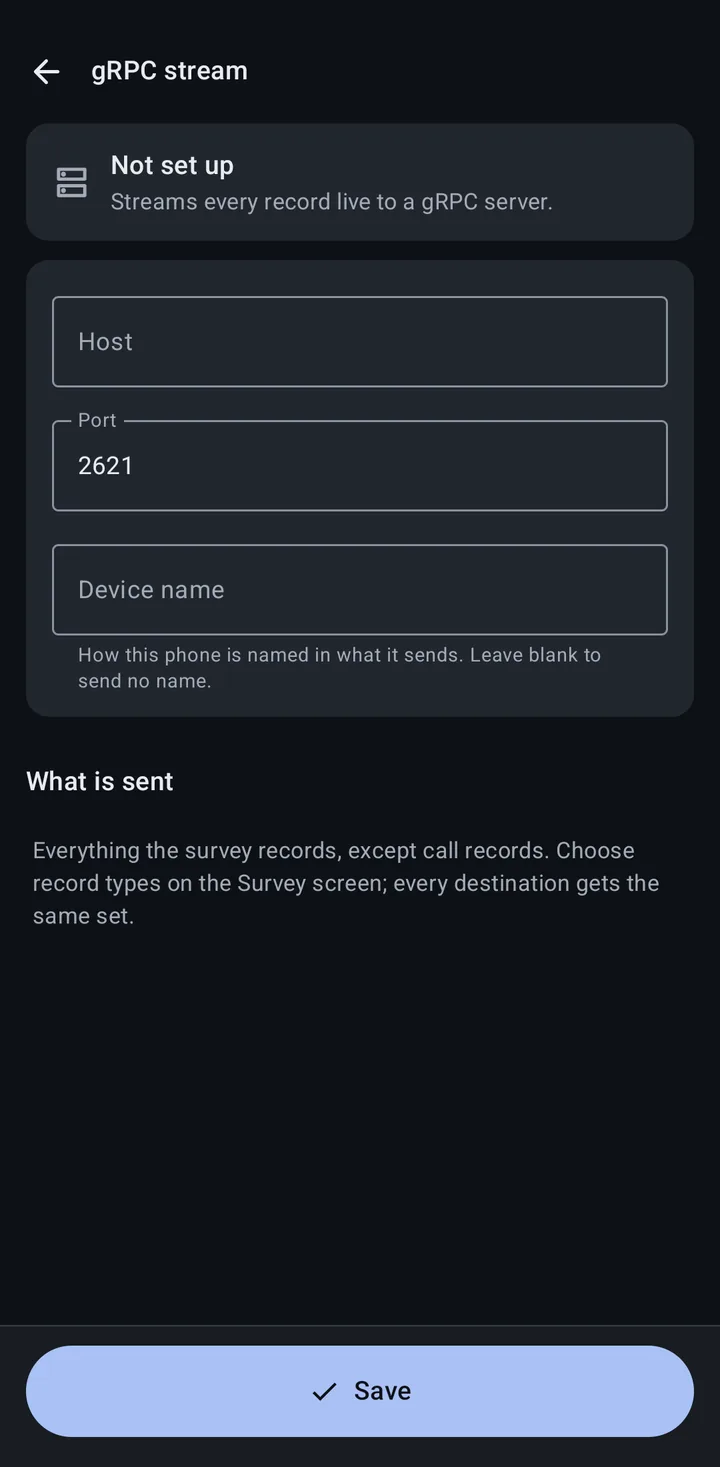
| Field | Default | Notes |
|---|---|---|
| Host | The server’s host name or address (required) | |
| Port | 2621 | 1 to 65535 |
| Device name | ”How this phone is named in what it sends. Leave blank to send no name.” |
Tap the button at the bottom to save. Before a server is saved it reads Save and turn on when saving also turns gRPC on for your next survey (no survey running and gRPC not yet on), or Save; once a server is saved it reads Save changes. Streaming starts when you tap Start survey with gRPC stream on. Saving a new address while a survey streams reconnects the stream; the survey keeps going.
The panel at the top shows where things stand:
- Not set up: no server saved yet.
- Ready to stream: a server is saved, with its address.
- Set up, turned off on the Survey screen: a server is saved but the gRPC stream row is off.
- Couldn’t reach the server: check the address and that the server is running.
- While a survey streams here, the panel shows the same status as the gRPC stream row on the Survey tab.
On a managed phone, your organization can turn the gRPC stream on or off, but it can’t set the server. If it is turned off, the page says “gRPC is turned off by your organization”. See MDM configuration.
On Android 17 and later, turning on the gRPC stream asks for access to devices on your local network. A server on the internet works whether or not you allow it.
What is streamed
Section titled “What is streamed”Every record type the survey records, except Call records and an NS Scout’s Raw frames, which only go to Log files:
- Cellular: GSM, CDMA, UMTS, LTE and NR records
- Phone state
- Wi-Fi beacon records
- Bluetooth records
- GNSS records
- With an NS Scout, Wi-Fi clients: client records (
StreamWifiClientSurvey) and probe request records (StreamWifiProbeRequestSurvey)
A server built before the client stream existed (before version 2.7.0 of Network Survey Messaging) answers it as unimplemented. The phone then stops sending client records to that server and keeps streaming everything else.
Device status messages (location, battery level, app version) are always sent while the stream is connected; there is no switch for them over gRPC. Wi-Fi watchlist events are not sent over gRPC; they go over MQTT only.
Choose record types on the Survey tab. There are no per-type gRPC switches: the gRPC stream gets all of them.
Setting up a gRPC server
Section titled “Setting up a gRPC server”Your server implements the gRPC services defined in the Network Survey Messaging repository. The phone streams survey records to the WirelessSurvey service (for example StreamLteSurvey and StreamWifiBeaconSurvey) and device status to the DeviceStatus service (StatusUpdate).
For a starting point, see the example server ns-messaging-go-grpc-server, “an example gRPC server written in Go that consumes and prints the Network Survey Messages”.
Message format
Section titled “Message format”gRPC uses binary Protocol Buffers, not JSON. The messages are defined in .proto files in the Network Survey Messaging repository. As an example, here is the LTE record:
message LteRecord {   string version = 1;   string messageType = 2;   LteRecordData data = 3;}
message LteRecordData {   string deviceSerialNumber = 1;   string deviceName = 2;   string deviceTime = 3;   double latitude = 4;   double longitude = 5;   float altitude = 6;   string missionId = 7;   int32 recordNumber = 8;   int32 groupNumber = 9;   int32 accuracy = 10;   uint32 locationAge = 11;   float speed = 55;
   google.protobuf.Int32Value mcc = 16;  // Deprecated: prefer plmn   google.protobuf.Int32Value mnc = 17;  // Deprecated: prefer plmn   google.protobuf.StringValue plmn = 60;  // PLMN in "MCC-MNC" format (e.g., "311-480")   google.protobuf.Int32Value tac = 18;   google.protobuf.Int32Value eci = 19;   google.protobuf.Int32Value earfcn = 20;   google.protobuf.Int32Value pci = 21;   google.protobuf.FloatValue rsrp = 22;   google.protobuf.FloatValue rsrq = 23;   google.protobuf.Int32Value ta = 24;   google.protobuf.BoolValue servingCell = 25;   com.craxiom.messaging.ltebandwidth.LteBandwidth lteBandwidth = 26;   string provider = 27;   google.protobuf.FloatValue signalStrength = 28;   google.protobuf.Int32Value cqi = 29;   google.protobuf.Int32Value slot = 30;   google.protobuf.FloatValue snr = 31;   com.craxiom.messaging.connectionstatus.ConnectionStatus connectionStatus = 61;   repeated int32 cellBandwidthsKhz = 62;}
See Message formats and the Network Survey Messaging documentation for every message.
Things to know
Section titled “Things to know”- Setup: you need a server that implements the services above; there is no ready-made receiver in the app.
- No QR code setup: unlike MQTT, the gRPC server is typed in on each phone.
- Debugging: the messages are binary, so use a gRPC tool or your server’s logs to inspect them.
Resources
Section titled “Resources”- Network Survey Messaging: documentation and GitHub
- gRPC: grpc.io and its documentation
Related
Section titled “Related”- Data streaming overview: how streams combine with other destinations
- MQTT streaming: the other streaming destination
- Message formats: what each message contains