Data streaming overview
Network Survey can send survey records live, as they are recorded, to a server you or your team runs. There are two streaming destinations:
- MQTT stream: JSON messages published to an MQTT broker. See MQTT streaming.
- gRPC stream: Protocol Buffers messages sent to a gRPC server. See gRPC streaming.
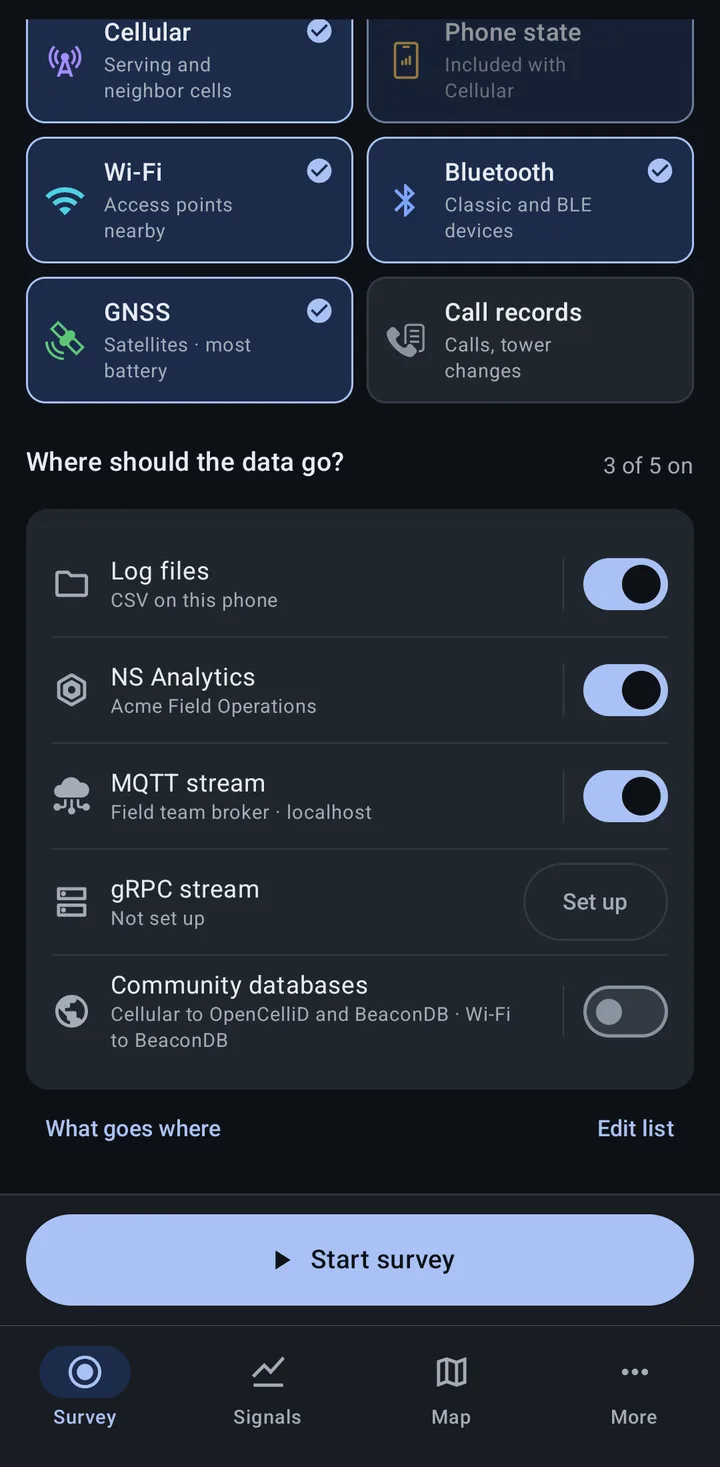
Both are destinations on the Survey tab, under Where should the data go?, next to Log files, NS Analytics and the Community databases. Each has its own page: tap its row on the Survey tab, or go to More > MQTT stream or More > gRPC stream.
What is sent
Section titled “What is sent”A stream gets every record type the survey records, except Call records and an NS Scout’s Raw frames, which only go to Log files. There are no per-type stream switches: choose record types on the Survey tab, and each stream that is on gets all of them except those two.
| Record type | MQTT stream | gRPC stream |
|---|---|---|
| Cellular (GSM, CDMA, UMTS, LTE, NR) | Yes | Yes |
| Phone state | Yes | Yes |
| Wi-Fi | Yes | Yes |
| Bluetooth | Yes | Yes |
| GNSS | Yes | Yes |
| Call records | No | No |
| Wi-Fi clients (NS Scout) | Yes | Yes |
| Raw frames (NS Scout) | No | No |
Two more kinds of message travel on the streams:
- Device status: the phone’s location, battery level and app version, sent regularly. Over MQTT it is on by default and can be turned off on the MQTT stream page (Send device status). Over gRPC it is always sent. How often it is sent is a scan rate.
- Wi-Fi watchlist events: matches and the phone’s watched networks, over MQTT only. They are controlled by More > Settings > Watchlist > Stream over MQTT (on by default). See Wi-Fi watchlist.
For the message layouts, see Message formats.
How streams combine with other destinations
Section titled “How streams combine with other destinations”A survey is one set of record types sent to every destination that is on, with one Start survey and one Stop survey. You can stream to MQTT and gRPC while also saving to Log files and uploading to NS Analytics; the phone scans once and every destination gets the records.
- Only Log files writes files. A survey that streams to MQTT or gRPC without Log files keeps no copy on the phone. Turn on Log files as well if you want a local backup.
- Changing a server while recording: saving a new broker or server address reconnects that stream; the survey keeps going.
- A stream that drops out shows its state (such as Connecting, Reconnecting or Dropping) on its row under Where it’s going while the survey records.
MQTT or gRPC?
Section titled “MQTT or gRPC?”| MQTT stream | gRPC stream | |
|---|---|---|
| Message format | JSON | Protocol Buffers (binary) |
| Encryption | TLS (on by default) | None: the connection is plaintext |
| Setup on the phone | Saved brokers, added by hand or by scanning a QR code | Host, port and an optional device name |
| Organization setup | The broker can be provided through MDM | MDM can turn it on or off, but can’t set the server |
| Wi-Fi watchlist events | Yes | No |
MQTT suits most setups: many brokers and IoT platforms accept it, and the JSON is easy to read. gRPC suits a custom server that already uses Protocol Buffers. Because the gRPC stream is not encrypted, use it on a network you trust.
Servers on your local network
Section titled “Servers on your local network”A broker or gRPC server can be on the internet or on your local network; a local server needs no internet connection. On Android 17 and later, turning on the MQTT stream or gRPC stream asks for access to devices on your local network. A server on the internet works whether or not you allow it.
Streaming queue limit
Section titled “Streaming queue limit”When the network is slow or gone, messages wait in a queue on the phone. More > Settings > Destinations > Streaming queue limit sets how many can wait (default 20,000; 0 turns the limit off, which can run the phone out of memory). If the MQTT queue fills while other destinations are on, MQTT drops new messages and the others keep recording; if MQTT is the only destination, scanning pauses until the queue drains. See App settings.
Related
Section titled “Related”- MQTT streaming: brokers, QR codes and topics
- gRPC streaming: the gRPC stream page
- Message formats: what each message contains
- Log files: keep a copy on the phone
- NS Analytics: a hosted workspace instead of your own server