Managed configuration (MDM)
Network Survey supports Android managed configurations (also called app restrictions). An administrator pushes a set of keys from an MDM or EMM console, and the app reads them on every phone. This page is for administrators: what each key does, what the person using the phone sees, and how the keys interact.
The complete list of keys is in the key reference at the end of this page. The schema the console reads is res/xml/app_restrictions.xml in the source code.
How it works
Section titled “How it works”A survey is one set of record types (what to record: Cellular, Phone state, Wi-Fi, Bluetooth, GNSS, Call records) sent to one set of destinations (where it goes: Log files, NS Analytics, MQTT stream, gRPC stream, Community databases). Every destination receives every record type the survey records, except where a destination cannot take a type: Call records only go to Log files, and the Community databases only take Cellular and Wi-Fi.
The managed configuration follows the same model. You can:
- turn record types and destinations on or off, or leave them to the person using the phone,
- start the survey automatically,
- provide an MQTT broker,
- allow or block NS Analytics, the community databases, and control by other apps,
- set the same options a person would set in Settings (scan rates, location source, battery pause, and more).
Any managed configuration makes the phone managed. As soon as the app sees at least one key, it treats the phone as managed, even if you only pushed MQTT broker keys. On a managed phone:
- The community databases are off unless you set
allow_external_data_uploadtotrue. - First run is skipped. The app opens on the Survey tab instead of the introduction cards, so Android’s own permission prompts (location, phone, and notifications on Android 13 and later, or storage on Android 12 and lower) appear when the app opens. If your MDM can grant runtime permissions, granting those avoids the prompts.
- Stop survey asks “Stop this survey?” first, with Stop survey and Keep surveying. When the survey starts automatically, it adds “It starts again the next time this phone restarts.”
- Settings and the More tab show Organization settings, and Settings shows Override organization settings.
What the person using the phone sees
Section titled “What the person using the phone sees”Record types and destinations you set to on show as on, with a building icon and Set by your organization. Tapping one explains that the organization chose it, with See all and Use my own settings. Items you set to off, and destinations a data permission blocks, are not listed at all. The Survey tab then says how many more are turned off, with See all.
Settings rows you set work the same way: they keep your value, show Set by your organization, and explain themselves on a tap.
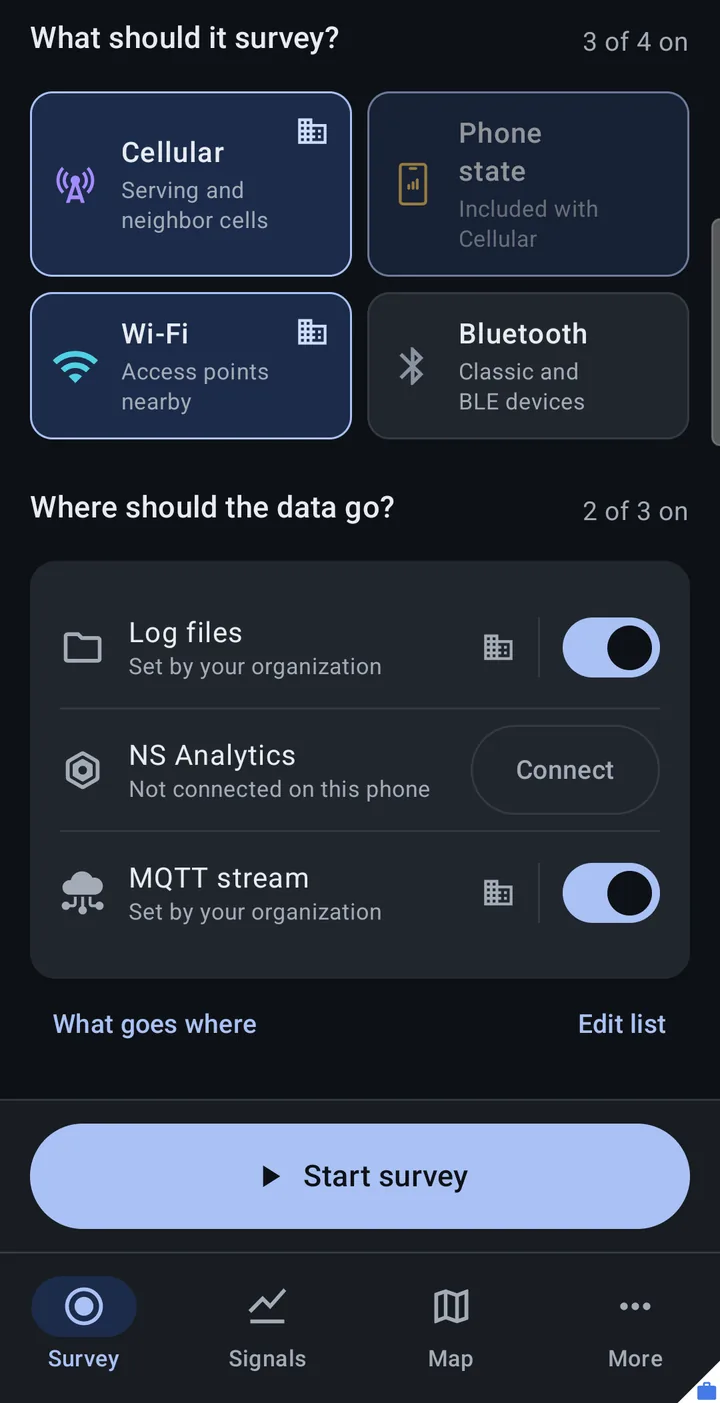
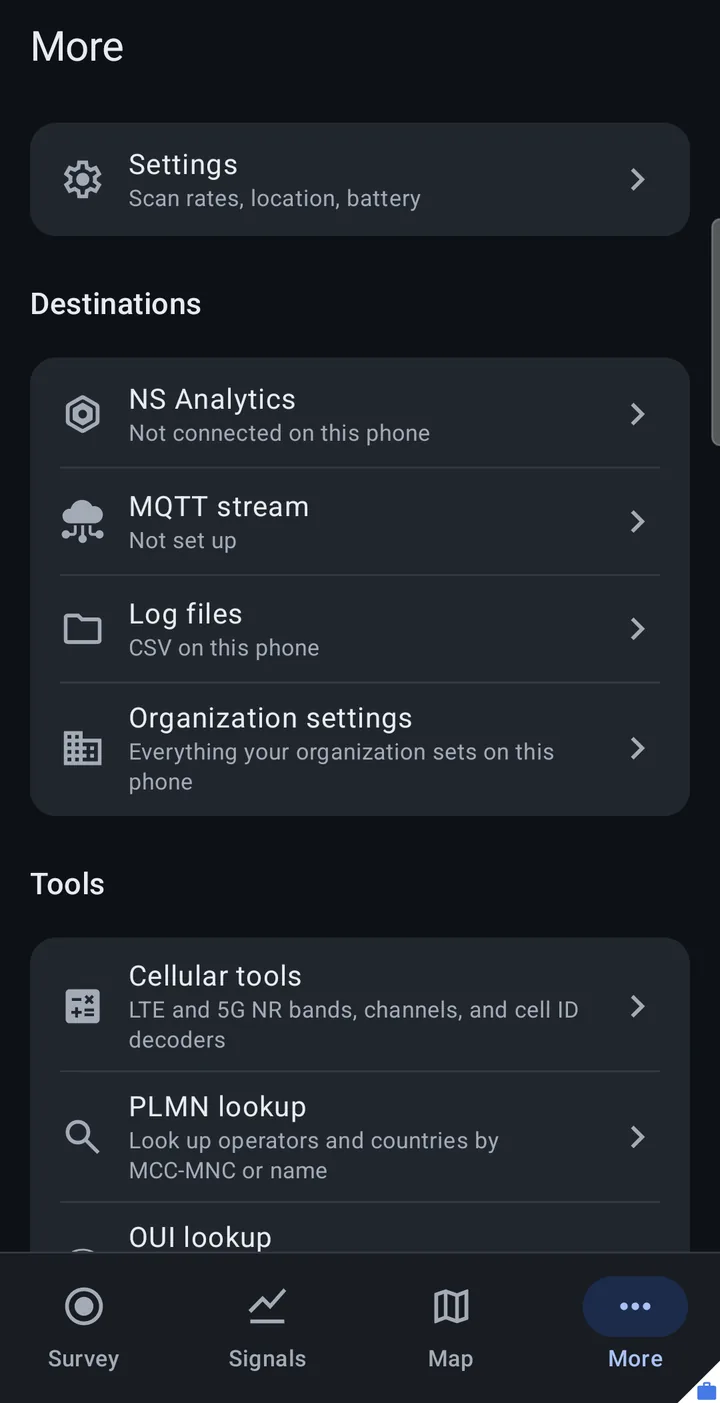
The second screenshot was taken while the configuration named a broker host but no client ID, so MQTT stream reads Not set up; the first was taken after the client ID was added (see Providing an MQTT broker).
The Organization settings page
Section titled “The Organization settings page”Organization settings (“Everything your organization sets on this phone”) lists every key you pushed, read only, under the title your console shows. It is reached from More (Destinations group), from Settings > Fleet, and from See all on any locked item.
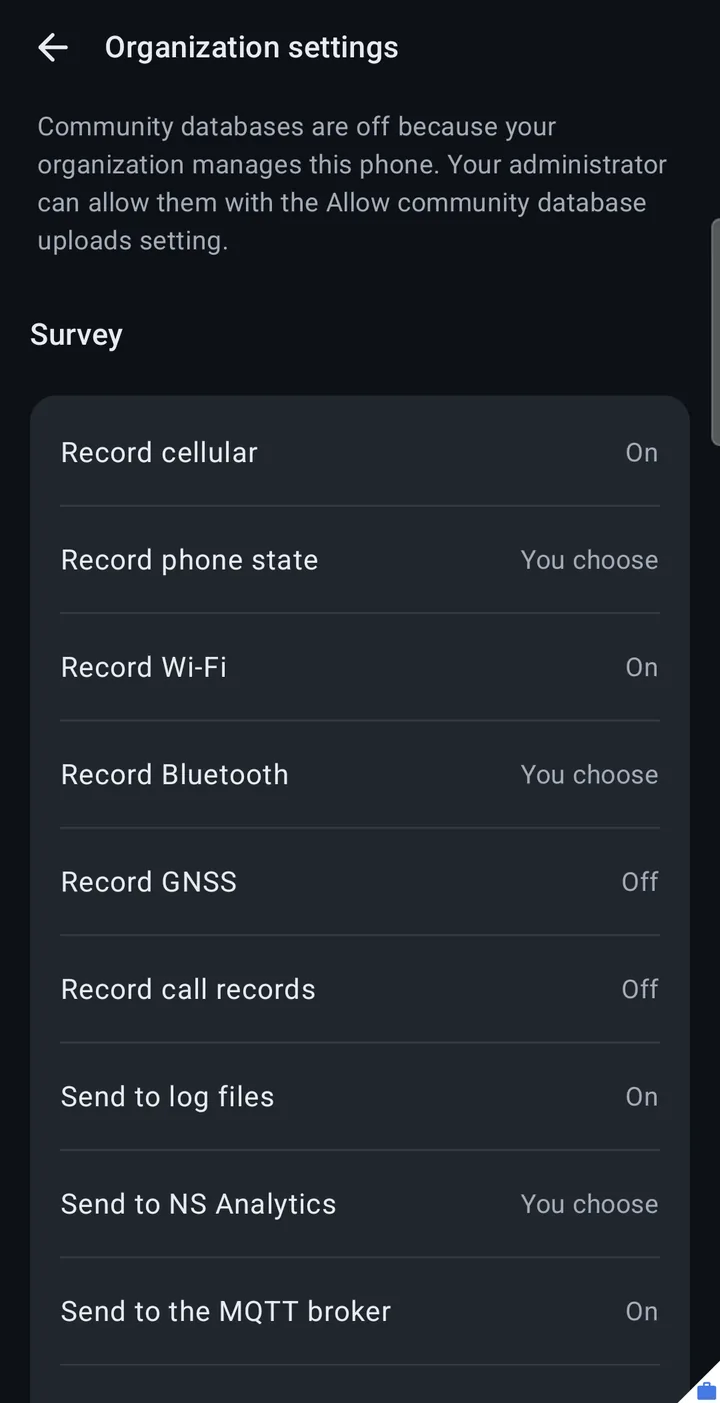
- Keys are grouped under Survey, Permissions, MQTT broker, and Everything else, in schema order.
- Survey choices read On, Off, or You choose. Other on/off keys read On or Off, and text and number keys show their value. A broker password shows only as Set.
- The Permissions group always lists Allow community database uploads, Allow NS Analytics, Allow NS Scout, and Let other apps start and stop surveys, with the value in force, even if you did not push them: Allowed, Not allowed, or You choose. When an NS Scout is paired (and allowed), it also shows Wi-Fi source: the Scout’s name or this phone.
- When you did not push
allow_external_data_upload, the page notes that the community databases are off because the organization manages the phone. - When you only pushed MQTT keys, it notes “Your organization provides the MQTT broker. Everything else is up to you.”
Record types and destinations
Section titled “Record types and destinations”Each of these keys is a choice with three values:
| Value | Console label | Meaning |
|---|---|---|
user | Operator chooses | The default, and what an absent key means. The person using the phone decides. |
on | Always on | Recorded in every survey (record types), or receives every survey (destinations). The person cannot turn it off. |
off | Off | Removed from the Survey tab. |
A console that only offers raw key and value entry may send a boolean instead: true counts as on and false as off. Any other value counts as user, so a typo never locks anything.
Record types: survey_cellular, survey_phone_state, survey_wifi, survey_bluetooth, survey_gnss, survey_cdr, and for the NS Scout record types survey_wifi_clients and survey_wifi_raw (see NS Scout).
survey_phone_stateset tooffwins over the phone’s Include phone state with cellular setting.- Call records read SMS and MMS only in the CDR build. See Build variants.
Destinations: destination_log_files, destination_ns_analytics, destination_mqtt, destination_grpc, destination_community.
destination_ns_analyticsset toondoes not register the phone. It still has to be connected to a workspace (see QR code registration), and until then the row offers Connect.destination_mqttuses the broker you provide with themqtt_*keys (below).- The gRPC server address cannot be set by managed configuration; the person sets it on the gRPC stream page.
destination_communityalso needsallow_external_data_uploadset totrue. Without it, the community databases stay off and hidden whatever this key says.
Starting automatically
Section titled “Starting automatically”auto_start_survey is a choice too:
onstarts the survey when the app opens and when the phone restarts.offnever starts it automatically.user(the default) uses Start survey automatically in the phone’s Settings.
The survey that starts is the person’s setup with your on and off choices applied, so it covers every destination in it, including MQTT and the community databases.
Auto start acts when the phone restarts and when the app is opened fresh (once per app launch). If the person stops a survey that your configuration shapes, opening the app does not start it again. (On a phone where no organization shapes the survey, it does: a fresh launch with auto start on starts the survey even after the person stopped it.) The next restart of the phone, or the next configuration you push, clears that, and auto start applies again. A stop from another app through the Intent API counts the same way.
Providing an MQTT broker
Section titled “Providing an MQTT broker”The phone uses your broker only when the configuration has both mqtt_connection_host and mqtt_client_id. With only a host, the app treats the phone as having no organization broker: Organization settings still lists the keys you pushed (for example “Send to the MQTT broker: On”), but the MQTT stream row reads Not set up unless the person has set up a broker of their own.
The other broker keys are optional: mqtt_connection_port (default 8883), mqtt_tls_enabled (default true), mqtt_username, mqtt_password, mqtt_topic_prefix, mqtt_qos (0, 1, or 2; anything else means 1), and mqtt_device_name (up to 100 characters; longer names are cut, and the client ID is used when it is not set). device_status_stream_enabled (default true) controls the device status heartbeat on your broker.
On the phone’s MQTT stream page, your broker shows as Provided by your organization: “Your organization provides this broker; it cannot be edited or removed.” The person cannot select or add their own brokers while yours is in force; any they had are kept for when they use their own settings. If you set the password, no copy of your broker can be shared as a QR code.
To send records to your broker, also set destination_mqtt to on, or leave it to the person. If you remove the broker from the configuration while it is streaming, MQTT disconnects; it does not switch to a broker of the person’s own.
watchlist_stream_enabled is the phone’s Stream over MQTT setting for watchlist events and applies to whichever broker the phone streams to. See MQTT.
Data permissions
Section titled “Data permissions”These three keys decide where data may go at all. The first two are never lifted by Override organization settings.
| Key | When absent | Effect |
|---|---|---|
allow_external_data_upload | Not allowed (on a managed phone) | true allows uploads to OpenCelliD and BeaconDB. Anything else keeps the community databases off and hidden, and beats destination_community. In Settings the uploads row reads “Turned off by your organization”. |
allow_ns_analytics | Allowed | Only false blocks NS Analytics: it is hidden from the Survey tab and More, and its Settings row reads “Turned off by your organization”. |
allow_intent_control | The person’s setting (on by default) | false makes the app ignore start and stop requests from other apps. It locks Let other apps start and stop surveys in Settings. |
NS Scout
Section titled “NS Scout”An NS Scout is an optional Bluetooth board that can take over as the phone’s Wi-Fi radio and adds two record types, Wi-Fi clients and Raw frames. Three keys control it:
| Key | When absent | Effect |
|---|---|---|
allow_ns_scout | Allowed | false hides More > Hardware > NS Scout and every Scout screen, and Wi-Fi comes from the phone. If a Scout was the Wi-Fi source, the app switches to the phone when the configuration arrives, including during a running survey: its Wi-Fi continues from the phone’s own scans, Wi-Fi clients and Raw frames drop out, and the Mission ID stays the same. |
survey_wifi_clients | Off (on a managed phone) | A choice like the other survey_* keys, for Wi-Fi clients. |
survey_wifi_raw | Off (on a managed phone) | A choice like the other survey_* keys, for Raw frames. Raw frames hold the addresses and network names of nearby devices and are saved only to Log files. |
- Off unless you name them. On a managed phone, the two Scout record types are off when their keys are absent, so a fleet configuration written before they existed stays as locked as it was. Their schema default is also
off, so a console that pushes every default gets the same result. Leaving them off this way doesn’t seed the phone’s starting setup and doesn’t change how the deprecated keys are read. useroron. Set a key touserto let the person using the phone choose, oronto record it in every survey while a Scout is the Wi-Fi source.survey_wifi_rawset toonalso needs Log files in the survey. When you set Raw frames toon, the phone does not ask its “Save raw Wi-Fi frames?” question.- Requests from other apps. Another app can’t start either type through the Intent API, including with the key set to
user. A key set toonstill applies to a survey another app starts, becauseonrecords it in every survey. - Without a Scout. Neither type can record until a Scout is paired and is the Wi-Fi source, whatever the keys say; the Survey tab doesn’t list them on a phone with no Scout.
- Scan rate. A locked
wifi_scan_interval_secondsalso sets how often a Scout’s records are saved. Settings says: “Your organization sets this interval, which also sets how often NS-ABCD saves each network.” allow_ns_scoutis a rule, not a setting the person has, so Override organization settings never lifts it. The override does liftsurvey_wifi_clientsandsurvey_wifi_raw, like the othersurvey_*keys.
Other settings
Section titled “Other settings”These keys set the same options a person sets on the phone, and lock the matching row:
| Key | Row it sets |
|---|---|
cellular_scan_interval_seconds, wifi_scan_interval_seconds, bluetooth_scan_interval_seconds, gnss_scan_interval_seconds, device_status_scan_interval_seconds | Settings > Survey > Scan rates (each field locks on its own) |
include_neighbor_cells | Settings > Survey > Include neighbor cells |
auto_include_phone_state_with_cellular | Settings > Survey > Include phone state with cellular |
location_provider | Settings > Phone > Location source |
battery_threshold_percent | Settings > Phone > Pause scanning on low battery |
streaming_queue_limit | Settings > Destinations > Streaming queue limit |
watchlist_stream_enabled | Settings > Watchlist > Stream over MQTT |
oui_lookup_enabled | Settings > Map and lookups > Manufacturer lookup |
auto_upload_enabled, auto_upload_wifi_only | Upload automatically and Upload on Wi-Fi only, in Upload settings for the Community databases |
log_rollover_size_mb | Start a new file every, on the Log files page |
ignore_wifi_scan_throttling_warning | No row. true hides the Wi-Fi scan throttling notice on the Wi-Fi list. Set it if you block developer options, so people are not sent there. |
When a configuration changes
Section titled “When a configuration changes”- A configuration you push applies to a running survey in place, with no new Mission ID. It never starts a survey that is not running.
- If the new configuration leaves nothing the phone may run, the running survey stops and the Survey tab says “Your organization stopped this survey.”
- Pushing an identical configuration again does nothing.
- A configuration that changed while the app was closed is applied the next time the app’s survey service starts.
- A phone that becomes managed takes your setup as its starting point, so a stream you turn on does not inherit what the person had picked before.
Override organization settings
Section titled “Override organization settings”The person using the phone can take over with Override organization settings (Settings > Fleet, managed phones only), or Use my own settings on any locked item, which asks “Use your own settings?” first. Your choices become their starting point, and nothing that is running changes at that moment. The notification and the Survey tab then say the phone is using its own settings.
What the override lifts:
- The record type, destination, and auto start choices (
survey_*,destination_*,auto_start_survey), and the deprecated keys that map onto them. - Every Settings row lock listed in Other settings, and the log file rollover lock.
allow_intent_control(see the caution above).- Your MQTT broker. The app saves a copy named “Copy of your organization’s broker” and selects it, so a running stream keeps going to the same broker; after that the person’s own brokers can be used.
What it does not lift:
allow_external_data_upload,allow_ns_analyticsandallow_ns_scout.ignore_wifi_scan_throttling_warning.
While the override is on, a configuration you push is recorded but not applied. The Survey tab shows “Your organization updated settings” with Review. Restore (on the Survey tab or the Organization settings page) asks “Restore your organization’s settings?” and then returns the phone to your configuration; a running survey changes in place.
Deprecated keys
Section titled “Deprecated keys”These pre-2.0 keys are still read in 2.0 so a fleet keeps working until you move to the new keys. They will be removed in a later release.
| Deprecated key | Use instead |
|---|---|
auto_start_logging (Cellular), auto_start_phone_state_logging, auto_start_wifi_logging, auto_start_bluetooth_logging, auto_start_gnss_logging, auto_start_cdr_logging | The matching survey_* keys, destination_log_files, and auto_start_survey |
cellular_stream_enabled, phone_state_stream_enabled, wifi_stream_enabled, bluetooth_stream_enabled, gnss_stream_enabled | The matching survey_* keys |
mqtt_start_on_boot | destination_mqtt and auto_start_survey |
How 2.0 reads them:
- Only keys that are present are read. A missing deprecated key never implies a value.
- Record types, destinations, and auto start fall back separately. Once you set any new key in one of those groups to
onoroff, the deprecated keys for that group are ignored. - A deprecated auto start key set to
trueturns auto start on, and adds that record type and Log files to the starting setup. - A broker from the configuration (host and client ID) turns MQTT on, as before. The stream flags choose the starting record types; when they are absent, the old defaults apply (Cellular, Phone state, and Wi-Fi on; Bluetooth and GNSS off).
mqtt_start_on_bootset totruewith a broker turns auto start on.- The deprecated keys never lock a record type; they only choose the starting setup. To keep a record type off every destination, set its
survey_*key tooff.
log_file_type was removed: CSV is the only log file format, and a pushed value is ignored.
Example: an MQTT fleet
Section titled “Example: an MQTT fleet”Record Cellular, Phone state, and Wi-Fi, send them to your broker, start at boot, and keep everything else up to the person:
survey_cellular = onsurvey_phone_state = onsurvey_wifi = ondestination_mqtt = onauto_start_survey = onmqtt_connection_host = mqtt.example.netmqtt_connection_port = 8883mqtt_tls_enabled = truemqtt_client_id = field-phone-07mqtt_username = (your username)mqtt_password = (your password)Set any item to off to remove it from the Survey tab.
Key reference
Section titled “Key reference”Every key in the schema, in schema order. “Schema default” is the default the schema declares, which consoles show; the app’s behavior when a key is absent is described in the sections above where it differs.
| Key | Type | Schema default | What it does |
|---|---|---|---|
survey_cellular | choice (user, on, off) | user | Record Cellular |
survey_phone_state | choice | user | Record Phone state; off beats Include phone state with cellular |
survey_wifi | choice | user | Record Wi-Fi |
survey_bluetooth | choice | user | Record Bluetooth |
survey_gnss | choice | user | Record GNSS |
survey_cdr | choice | user | Record Call records |
survey_wifi_clients | choice | off | Record Wi-Fi clients (NS Scout only); absent means off on a managed phone |
survey_wifi_raw | choice | off | Save raw frames (NS Scout only, Log files only); absent means off on a managed phone |
destination_log_files | choice | user | Send to Log files |
destination_ns_analytics | choice | user | Send to NS Analytics (does not register the phone) |
destination_mqtt | choice | user | Send to the MQTT broker |
destination_grpc | choice | user | Send to the gRPC server |
destination_community | choice | user | Send to the community databases (also needs allow_external_data_upload) |
auto_start_survey | choice | user | Start the survey when the app opens and when the phone restarts |
mqtt_start_on_boot | bool | true | Deprecated. With a broker, true turns auto start on |
mqtt_connection_host | string | empty | Broker host. Needs mqtt_client_id too |
mqtt_connection_port | integer | 8883 | Broker port |
mqtt_tls_enabled | bool | true | Use TLS |
mqtt_client_id | string | %username% | Client ID. Needs mqtt_connection_host too |
mqtt_device_name | string | empty | Device name in MQTT records, up to 100 characters; the client ID when unset |
mqtt_username | string | none | Broker username |
mqtt_password | string | none | Broker password; shown only as Set; blocks sharing as a QR code |
cellular_scan_interval_seconds | integer | 5 | Cellular scan interval |
wifi_scan_interval_seconds | integer | 15 | Wi-Fi scan interval |
bluetooth_scan_interval_seconds | integer | 30 | Bluetooth scan interval; below 24 behaves as 24 |
gnss_scan_interval_seconds | integer | 45 | GNSS scan interval |
device_status_scan_interval_seconds | integer | 120 | Device status message interval |
cellular_stream_enabled | bool | true | Deprecated stream flag |
phone_state_stream_enabled | bool | true | Deprecated stream flag |
wifi_stream_enabled | bool | true | Deprecated stream flag |
bluetooth_stream_enabled | bool | false | Deprecated stream flag |
gnss_stream_enabled | bool | false | Deprecated stream flag |
device_status_stream_enabled | bool | true | Device status messages on the organization’s broker |
watchlist_stream_enabled | bool | true | Watchlist events over MQTT (Stream over MQTT) |
mqtt_topic_prefix | string | none | Prefix for the MQTT topics, for example my/custom/topic/ |
mqtt_qos | integer | 1 | MQTT QoS: 0, 1, or 2; anything else means 1 |
log_rollover_size_mb | integer | 10 | Start a new file every N MB; 0 means never; values above 1000 behave as 1000 |
auto_start_logging | bool | true | Deprecated: auto start Cellular to Log files |
auto_start_phone_state_logging | bool | false | Deprecated: auto start Phone state to Log files |
auto_start_wifi_logging | bool | true | Deprecated: auto start Wi-Fi to Log files |
auto_start_bluetooth_logging | bool | false | Deprecated: auto start Bluetooth to Log files |
auto_start_gnss_logging | bool | false | Deprecated: auto start GNSS to Log files |
auto_start_cdr_logging | bool | false | Deprecated: auto start Call records to Log files |
auto_include_phone_state_with_cellular | bool | true | Include phone state with cellular |
include_neighbor_cells | bool | true | Include neighbor cells |
ignore_wifi_scan_throttling_warning | bool | true | Hide the Wi-Fi scan throttling notice (without this key the notice shows) |
location_provider | integer | 3 | Location source: 0 Fused, 1 GNSS, 2 Network, 3 All |
allow_intent_control | bool | true | Let other apps start and stop surveys |
oui_lookup_enabled | bool | true | Manufacturer lookup |
auto_upload_enabled | bool | false | Upload automatically to the community databases |
auto_upload_wifi_only | bool | true | Upload on Wi-Fi only |
allow_external_data_upload | bool | false | Allow community database uploads |
allow_ns_analytics | bool | true | Allow NS Analytics; only false blocks |
allow_ns_scout | bool | true | Allow NS Scout; false hides it and keeps Wi-Fi on the phone |
battery_threshold_percent | integer | 0 | Pause scanning at this battery level, 0 to 95; 0 never pauses |
streaming_queue_limit | integer | 20000 | Streaming queue limit, 0 to 100000; 0 turns the limit off |