Cellular networks
Network Survey collects data from every cellular network type Android reports, from 2G GSM through 5G NR. Each technology has its own identifiers and signal measurements, described below.
The full list of fields in a cellular record is defined in the NS Messaging API documentation.
Supported technologies
Section titled “Supported technologies”| Technology | Generation | Common names | Status |
|---|---|---|---|
| GSM | 2G | 2G, GPRS, EDGE | Legacy (being phased out) |
| CDMA | 2G/3G | CDMA2000, 1xRTT | Legacy (mostly retired) |
| UMTS | 3G | 3G, WCDMA, HSPA, HSPA+ | Legacy (being retired) |
| LTE | 4G | 4G, LTE, LTE-A | Widespread |
| NR | 5G | 5G, 5G NR | Growing deployment |
CDMA cells are recorded, logged, and streamed, but the Cellular view does not show them.
The Cellular view
Section titled “The Cellular view”Open Signals and pick Cellular. The view needs precise location and the Phone permission, and Android only shares cell details while location is on. If something is missing, the view says what and offers the one button that fixes it. It also says when airplane mode is on, and shows “Waiting for the first scan” until the first scan arrives.
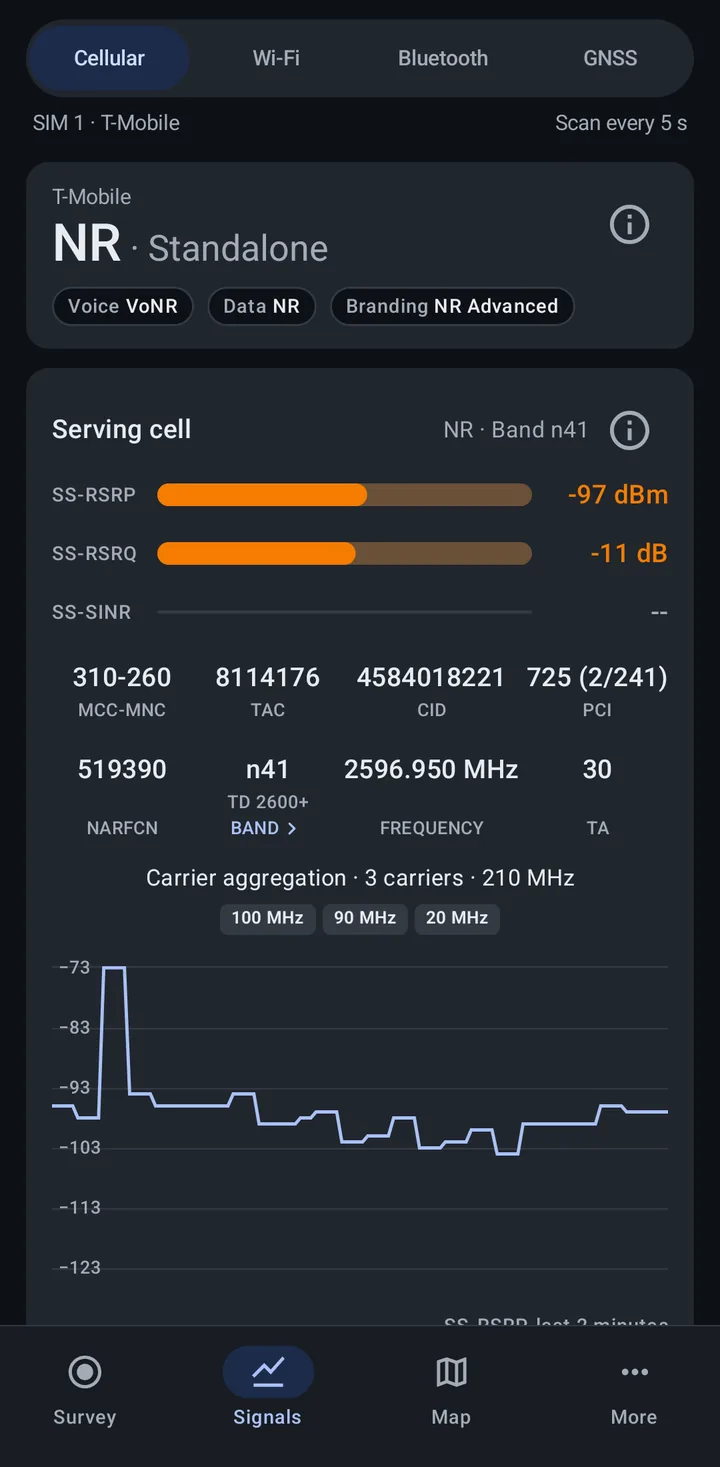
The line under the view picker names the SIM the view is reading, such as “SIM 1 · T-Mobile”, and how often it scans (“Scan every 5 s” by default).
Network technology
Section titled “Network technology”The panel at the top shows the carrier name and, in large type, the network you are on:
- LTE, UMTS, GSM, and so on for the technology carrying data
- NR · Standalone for 5G Standalone
- LTE + NR · NSA for 5G Non-Standalone, where NR is added onto an LTE anchor
- No service or Unknown when there is nothing to report
Under it are three pills:
- Voice: the technology carrying calls. Wi-Fi calling is detected directly. VoLTE and VoNR are inferred, because Android does not expose them to apps.
- Data: the technology carrying data. It often matches the large line.
- Branding: the label your carrier asks the phone to show in the status bar, which can differ from the real technology (for example a 5G icon on an LTE connection). The app shows Android’s category for it: LTE-CA, LTE Adv Pro, NR NSA, NR NSA mmWave, NR Advanced, or None when the carrier applies none.
Tap the info button on the panel for the same explanation in the app.
Serving cell
Section titled “Serving cell”The Serving cell card shows the cell your phone is registered on, with its technology and band in the title (“NR · Band n41”, “LTE · Band 66”).
- Signal bars. Each signal measurement gets a bar and a value in the color of its step on the signal scale. A measurement the phone did not report shows
--with an empty bar. - Values. The identifiers for the technology, listed per technology below. LTE adds the eNB ID and Sector ID calculated from the CID, and UMTS adds the RNC ID and Short CID. The PCI of an LTE or NR cell is followed by its PSS and SSS in parentheses, for example
725 (2/241). - Band. Tap the Band value to open that band’s details from the band reference. When the cell reports more than one candidate band, you pick one first.
- Carrier aggregation. When the phone uses more than one carrier, a line such as “Carrier aggregation · 3 carriers · 210 MHz” appears, with one chip per carrier’s bandwidth.
- Chart. The main signal measurement over the last 2 minutes: RSRP for LTE, SS-RSRP for NR, and RSSI for GSM and UMTS.
The info button on the card opens a glossary of the terms for that technology.
5G NR secondary cell
Section titled “5G NR secondary cell”The 5G NR secondary cell card shows “the 5G carrier your phone is using alongside its primary cell”. On 5G Non-Standalone networks the phone registers on an LTE cell and the 5G data flows through this NR cell, so it shows here instead of under the neighbors. On 5G Standalone with carrier aggregation, it is an additional NR carrier.
On NSA networks the NR cell only attaches while data is moving and drops a few seconds after the transfer stops. When that happens the card dims, keeps the last values it saw, and shows an Idle tag with “Last seen … ago”. It returns to live values the next time data flows. If you see 5G come and go, this is usually why.
Neighbors
Section titled “Neighbors”Below the cards, neighbor cells are listed by technology (NR neighbors, LTE neighbors, UMTS neighbors, GSM neighbors), strongest first. Each row leads with the PCI (PSC for UMTS, BSIC for GSM), then the channel and other values the phone reported, with the signal on the right.
With Include neighbor cells turned off in Settings, neighbor cells are left out of the records and out of this view; serving and secondary serving cells stay.
More than one SIM
Section titled “More than one SIM”On a phone with two active SIMs, tabs at the top of the view switch between them (“SIM 1 · Carrier”, “SIM 2 · Carrier”). With one SIM or none there are no tabs.
Copying values
Section titled “Copying values”Long-press the technology line or any value on the Serving cell or 5G NR secondary cell card to copy it.
Signal colors
Section titled “Signal colors”The Cellular view colors each signal value on a five-step scale. The Map uses the same scale for My survey points, so the two always agree.
For the strength measurements in dBm:
| Step | LTE RSRP and NR SS-RSRP | GSM and UMTS RSSI, UMTS RSCP |
|---|---|---|
| Strong | above -85 dBm | above -75 dBm |
| Good | -85 to -95 dBm | -75 to -85 dBm |
| Fair | -95 to -105 dBm | -85 to -95 dBm |
| Weak | -105 to -115 dBm | -95 to -105 dBm |
| Very weak | below -115 dBm | below -105 dBm |
A value exactly on a boundary belongs to the weaker step, so -85 dBm RSRP is Good.
The quality measurements in dB use the same steps for LTE and NR:
| Step | LTE RSRQ and NR SS-RSRQ | LTE SNR and NR SS-SINR |
|---|---|---|
| Strong | -10 dB or better | 20 dB or better |
| Good | -11 to -13 dB | 13 to 19 dB |
| Fair | -14 to -16 dB | 5 to 12 dB |
| Weak | -17 to -19 dB | 0 to 4 dB |
| Very weak | -20 dB or worse | below 0 dB |
Serving and neighbor cells
Section titled “Serving and neighbor cells”- Serving cell: the cell your phone is registered on.
- Secondary serving cell: an extra cell the phone uses at the same time, such as the NR cell on a 5G NSA connection.
- Neighbor cells: nearby cells the phone detects but is not using.
Neighbor data helps analyze coverage overlap, handover behavior, and network density.
GSM (2G)
Section titled “GSM (2G)”Identifiers
Section titled “Identifiers”- MCC (Mobile Country Code): country identifier (for example 310 for the USA)
- MNC (Mobile Network Code): carrier identifier (for example 260 for T-Mobile)
- PLMN (Public Land Mobile Network): the combined “MCC-MNC” identifier (for example “310-260”); keeps the MNC’s leading zeros
- LAC (Location Area Code): a group of towers used for paging
- CID (Cell Identity): the cell’s identifier
- ARFCN (Absolute Radio Frequency Channel Number): the frequency channel
- BSIC (Base Station Identity Code): physical layer identifier (0 to 63)
Signal
Section titled “Signal”- RSSI (Received Signal Strength Indicator): received power in dBm
UMTS (3G)
Section titled “UMTS (3G)”Identifiers
Section titled “Identifiers”- MCC, MNC, PLMN: country, carrier, and network identifiers
- LAC: location area code
- CID: cell identity (28 bits)
- RNC ID: Radio Network Controller identifier (the first 12 bits of the CID)
- Short CID: the last 16 bits of the CID
- UARFCN: the UMTS frequency channel
- PSC (Primary Scrambling Code): physical layer identifier (0 to 511)
Signal
Section titled “Signal”- RSSI: received power in dBm
- RSCP (Received Signal Code Power): reference signal power in dBm
LTE (4G)
Section titled “LTE (4G)”Identifiers
Section titled “Identifiers”- MCC, MNC, PLMN: country, carrier, and network identifiers
- TAC (Tracking Area Code): a group of towers used for paging
- CID (Cell Identity): the cell’s identifier (28 bits)
- eNB ID: the tower identifier (the first 20 bits of the CID)
- Sector ID: the cell panel or sector (the last 8 bits of the CID)
- EARFCN: the LTE frequency channel
- Band: the frequency band number
- PCI (Physical Cell ID): physical layer identifier (0 to 503)
- Bandwidth: signal width (1.4, 3, 5, 10, 15, or 20 MHz)
- TA (Timing Advance): RF distance from the tower; larger values mean farther away
- CQI (Channel Quality Indicator): downlink quality (0 to 15, higher is better)
Signal
Section titled “Signal”- RSRP (Reference Signal Received Power): reference signal power, valid range -140 to -44 dBm
- RSRQ (Reference Signal Received Quality): signal quality, valid range -19.5 to -3 dB
- SNR (Signal-to-Noise Ratio): signal clarity, full range -20 to +30 dB
NR (5G)
Section titled “NR (5G)”Identifiers
Section titled “Identifiers”- MCC, MNC, PLMN: country, carrier, and network identifiers
- TAC: tracking area code
- CID: the NR Cell Identity (NCI, 36 bits). The card shows it whole. The gNB ID takes the first 22 to 32 bits depending on the network, so to split an NCI into a gNB ID and sector ID, use the NCI calculator with your network’s gNB ID length.
- NARFCN (NR Absolute Radio Frequency Channel Number): the frequency channel
- Band: the 3GPP NR band (for example n41). Bands below n257 are Sub-6 (FR1); n257 and above are mmWave (FR2).
- Frequency: the carrier center frequency in MHz, calculated from the NARFCN
- PCI: physical layer identifier (0 to 1007)
- TA (Timing Advance): RF distance from the tower, reported by Android 14 and later in microseconds
Signal
Section titled “Signal”- SS-RSRP (Synchronization Signal RSRP): reference signal power, valid range -156 to -31 dBm
- SS-RSRQ (Synchronization Signal RSRQ): signal quality, valid range -43 to 20 dB
- SS-SINR (Synchronization Signal SINR): signal relative to interference and noise, valid range -23 to 40 dB
Related
Section titled “Related”- Network technologies overview: the Signals tab
- Required permissions: Phone and Location permissions
- Cellular terminology: the full glossary
- Map: towers and your serving cell on a map
- Cellular tools: band reference and cell ID calculators